

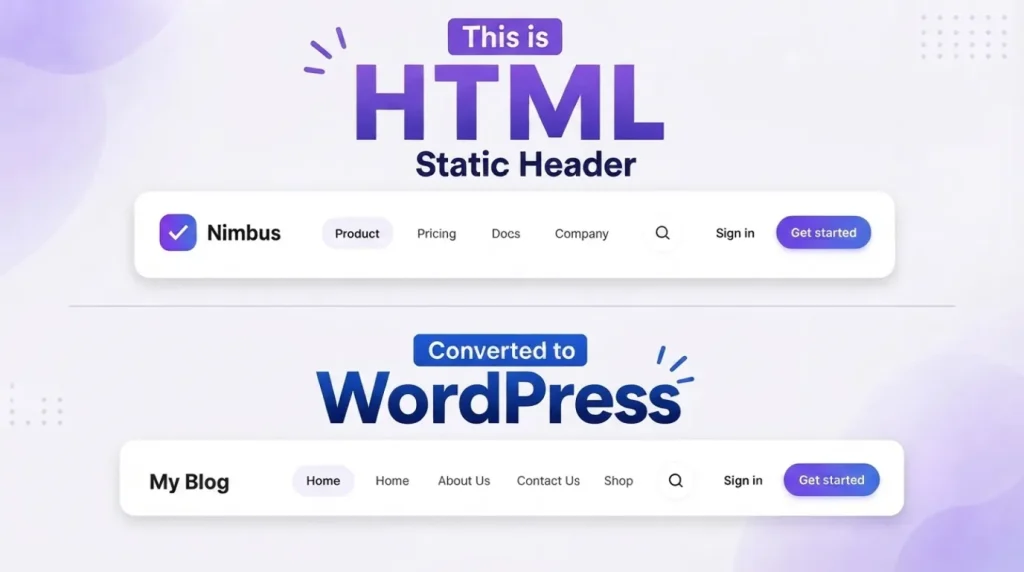
Introduction
Have you designed a website using HTML, CSS, and JavaScript and now want to convert it into a dynamic WordPress website?
WordPress makes it possible to turn a static HTML design into a fully manageable website where content such as the logo, navigation menu, blog posts, images, titles, and other sections can be controlled from the WordPress dashboard.
In this tutorial, you will learn how to integrate custom HTML into WordPress and make it dynamic using a custom WordPress theme structure, PHP, WordPress functions, and custom fields.
This method is especially useful if you already have a custom website design and don’t want to rebuild the entire design using a page builder.
What Does It Mean to Make Custom HTML Dynamic in WordPress?
A static HTML website contains fixed content.
For example:
My Website
Welcome to my website.
If you want to change the title, you need to edit the HTML file manually.
A dynamic WordPress website works differently. Instead of hardcoding the content, you can use WordPress functions to retrieve information from the database.
For example:
Now WordPress automatically displays the title of the current page or post.
This is the basic idea behind converting a static HTML website into a dynamic WordPress website.
How to Integrate Custom HTML Header to WordPress
In this tutorial, we will use the OceanWP theme and a child theme so that our customizations remain safe when the parent theme is updated.
- Create a child theme of OceanWP
- Integrate the HTML header into WordPress
- Start making the header dynamic
Important: This tutorial uses PHP template files instead of a page builder for the header.
Why Use a Child Theme?
Before modifying any WordPress theme files, creating a child theme is highly recommended.
A child theme allows you to customize the parent theme without directly modifying its original files.
For example, if you modify the OceanWP theme directly and later update OceanWP, your custom changes can potentially be overwritten.
With a child theme, your custom template files, CSS, JavaScript, and PHP modifications can be maintained separately.
For our project, the basic structure can look like this:
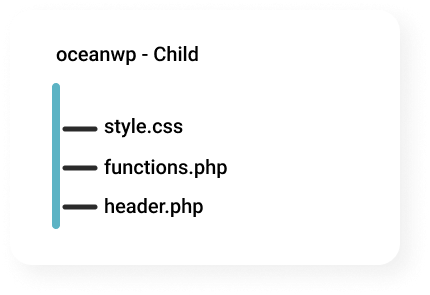
Step 1: Create an OceanWP Child Theme
The first step is to create a child theme for OceanWP.
Go to your WordPress installation and locate:
/wp-content/themes/
Inside the themes folder, create a new folder:
style.css, functions.php
You can then add the basic child-theme information to style.css:
/*
Theme Name: OceanWP Child
Template: oceanwp
*/
The important part here is:
Template: oceanwp
This tells WordPress that the new theme is a child theme of OceanWP.
Next, you can load the parent OceanWP stylesheet from your child theme’s functions.php:
<?php

function oceanwp_child_enqueue() {

    wp_enqueue_style(
        'parent-style',
        get_template_directory_uri() . '/style.css'
    );

}

add_action(
    'wp_enqueue_scripts',
    'oceanwp_child_enqueue'
);
Now go to:
WordPress Dashboard → Appearance → Themes
Activate it.
Your website should continue to look similar to the original OceanWP website because the child theme is using the parent theme’s functionality and styling.
Step 2: Integrate HTML Header Code into WordPress
Now comes the main part.
Suppose We already have following Custom Header Code
<!DOCTYPE html>
<html lang="en">
<head>
<meta charset="UTF-8">
<meta name="viewport" content="width=device-width, initial-scale=1.0">
<title>Responsive Header</title>
<link rel="preconnect" href="https://fonts.googleapis.com">
<link rel="preconnect" href="https://fonts.gstatic.com" crossorigin>
<link href="https://fonts.googleapis.com/css2?family=Sora:wght@500;600;700&family=Inter:wght@400;500;600&display=swap" rel="stylesheet">
<link rel="stylesheet" href="style.css">
</head>
<body>

<header class="site-header" id="siteHeader">
  <div class="header-inner">

    <a href="#" class="brand">
      <span class="brand-mark" aria-hidden="true">
        <svg viewBox="0 0 32 32" width="42" height="42">
          <rect x="1" y="1" width="30" height="30" rx="9" fill="url(#brandGrad)"/>
          <path d="M9 17.5 L14 22.5 L23 10.5" stroke="#fff" stroke-width="2.6" stroke-linecap="round" stroke-linejoin="round" fill="none"/>
          <defs>
            <linearGradient id="brandGrad" x1="0" y1="0" x2="32" y2="32">
              <stop offset="0" stop-color="#8556f2"/>
              <stop offset="1" stop-color="#57a3fb"/>
            </linearGradient>
          </defs>
        </svg>
      </span>
      <span class="brand-name">Nimbus</span>
    </a>

    <nav class="main-nav" id="mainNav" aria-label="Primary">
      <ul class="nav-list" id="navList">
        <li><a href="#" class="nav-link active" data-nav>Product</a></li>
        <li><a href="#" class="nav-link" data-nav>Pricing</a></li>
        <li><a href="#" class="nav-link" data-nav>Docs</a></li>
        <li><a href="#" class="nav-link" data-nav>Company</a></li>
      </ul>
      <span class="nav-indicator" id="navIndicator" aria-hidden="true"></span>
    </nav>

    <div class="search-box" id="searchBox">
      <svg class="search-icon" width="17" height="17" viewBox="0 0 24 24" fill="none" stroke="currentColor" stroke-width="2.2" stroke-linecap="round" stroke-linejoin="round">
        <circle cx="11" cy="11" r="7"></circle>
        <line x1="21" y1="21" x2="16.65" y2="16.65"></line>
      </svg>
      <input type="text" class="search-input" placeholder="Search..." aria-label="Search">
      <kbd class="search-kbd">/</kbd>
    </div>

    <button class="search-toggle" id="searchToggle" aria-label="Search">
      <svg width="19" height="19" viewBox="0 0 24 24" fill="none" stroke="currentColor" stroke-width="2.2" stroke-linecap="round" stroke-linejoin="round">
        <circle cx="11" cy="11" r="7"></circle>
        <line x1="21" y1="21" x2="16.65" y2="16.65"></line>
      </svg>
    </button>

    <div class="header-actions">
      <a href="#" class="btn btn-ghost">Sign in</a>
      <a href="#" class="btn btn-primary">Get started</a>
    </div>

    <button class="menu-toggle" id="menuToggle" aria-label="Toggle menu" aria-expanded="false" aria-controls="mobileNav">
      <span class="bar"></span>
      <span class="bar"></span>
      <span class="bar"></span>
    </button>
  </div>

  <div class="mobile-nav" id="mobileNav">
    <div class="mobile-search">
      <svg width="17" height="17" viewBox="0 0 24 24" fill="none" stroke="currentColor" stroke-width="2.2" stroke-linecap="round" stroke-linejoin="round">
        <circle cx="11" cy="11" r="7"></circle>
        <line x1="21" y1="21" x2="16.65" y2="16.65"></line>
      </svg>
      <input type="text" placeholder="Search..." aria-label="Search">
    </div>
    <ul class="mobile-nav-list">
      <li><a href="#" class="mobile-nav-link active">Product</a></li>
      <li><a href="#" class="mobile-nav-link">Pricing</a></li>
      <li><a href="#" class="mobile-nav-link">Docs</a></li>
      <li><a href="#" class="mobile-nav-link">Company</a></li>
    </ul>
    <div class="mobile-actions">
      <a href="#" class="btn btn-ghost btn-block">Sign in</a>
      <a href="#" class="btn btn-primary btn-block">Get started</a>
    </div>
  </div>
</header>

<main class="demo-content">
  <p>Scroll down to see the header shrink and pick up a shadow.</p>
  <div style="height:1400px;"></div>
</main>

<script src="script.js"></script>
</body>
</html>
Our original header contains:
- Logo
- Navigation
- Search
- Sign In button
- Get Started button
- Mobile navigation
- Mobile search
- Mobile menu button
The important thing at this stage is not to make anything dynamic yet.
First, we want to make sure that our existing HTML design works correctly inside WordPress.
Add the Static HTML Header
Now create:
header.php
inside your child theme.
At this stage, take the header markup from your HTML design and place it into the template.
Your original header looks like this:
<header class="site-header" id="siteHeader">
  <div class="header-inner">

    <a href="#" class="brand">
      <span class="brand-mark" aria-hidden="true">
        <svg viewBox="0 0 32 32" width="42" height="42">
          <rect x="1" y="1" width="30" height="30" rx="9" fill="url(#brandGrad)"/>
          <path d="M9 17.5 L14 22.5 L23 10.5" stroke="#fff" stroke-width="2.6" stroke-linecap="round" stroke-linejoin="round" fill="none"/>
          <defs>
            <linearGradient id="brandGrad" x1="0" y1="0" x2="32" y2="32">
              <stop offset="0" stop-color="#8556f2"/>
              <stop offset="1" stop-color="#57a3fb"/>
            </linearGradient>
          </defs>
        </svg>
      </span>
      <span class="brand-name">Nimbus</span>
    </a>

    <nav class="main-nav" id="mainNav" aria-label="Primary">
      <ul class="nav-list" id="navList">
        <li><a href="#" class="nav-link active" data-nav>Product</a></li>
        <li><a href="#" class="nav-link" data-nav>Pricing</a></li>
        <li><a href="#" class="nav-link" data-nav>Docs</a></li>
        <li><a href="#" class="nav-link" data-nav>Company</a></li>
      </ul>
      <span class="nav-indicator" id="navIndicator" aria-hidden="true"></span>
    </nav>

    <div class="search-box" id="searchBox">
      <svg class="search-icon" width="17" height="17" viewBox="0 0 24 24" fill="none" stroke="currentColor" stroke-width="2.2" stroke-linecap="round" stroke-linejoin="round">
        <circle cx="11" cy="11" r="7"></circle>
        <line x1="21" y1="21" x2="16.65" y2="16.65"></line>
      </svg>
      <input type="text" class="search-input" placeholder="Search..." aria-label="Search">
      <kbd class="search-kbd">/</kbd>
    </div>

    <button class="search-toggle" id="searchToggle" aria-label="Search">
      <svg width="19" height="19" viewBox="0 0 24 24" fill="none" stroke="currentColor" stroke-width="2.2" stroke-linecap="round" stroke-linejoin="round">
        <circle cx="11" cy="11" r="7"></circle>
        <line x1="21" y1="21" x2="16.65" y2="16.65"></line>
      </svg>
    </button>

    <div class="header-actions">
      <a href="#" class="btn btn-ghost">Sign in</a>
      <a href="#" class="btn btn-primary">Get started</a>
    </div>

    <button class="menu-toggle" id="menuToggle" aria-label="Toggle menu" aria-expanded="false" aria-controls="mobileNav">
      <span class="bar"></span>
      <span class="bar"></span>
      <span class="bar"></span>
    </button>
  </div>

  <div class="mobile-nav" id="mobileNav">
    <div class="mobile-search">
      <svg width="17" height="17" viewBox="0 0 24 24" fill="none" stroke="currentColor" stroke-width="2.2" stroke-linecap="round" stroke-linejoin="round">
        <circle cx="11" cy="11" r="7"></circle>
        <line x1="21" y1="21" x2="16.65" y2="16.65"></line>
      </svg>
      <input type="text" placeholder="Search..." aria-label="Search">
    </div>
    <ul class="mobile-nav-list">
      <li><a href="#" class="mobile-nav-link active">Product</a></li>
      <li><a href="#" class="mobile-nav-link">Pricing</a></li>
      <li><a href="#" class="mobile-nav-link">Docs</a></li>
      <li><a href="#" class="mobile-nav-link">Company</a></li>
    </ul>
    <div class="mobile-actions">
      <a href="#" class="btn btn-ghost btn-block">Sign in</a>
      <a href="#" class="btn btn-primary btn-block">Get started</a>
    </div>
  </div>
</header>
Important
Your original standalone HTML contains:
<!DOCTYPE html>
<html>
<head>
<body>
You should not duplicate the complete HTML document structure inside the header template.
The WordPress theme already handles the document structure.
Therefore, when integrating it into header.php, focus on the header markup:
This Post Has One Comment
Nice post. I learn something totally new and challenging on websites